

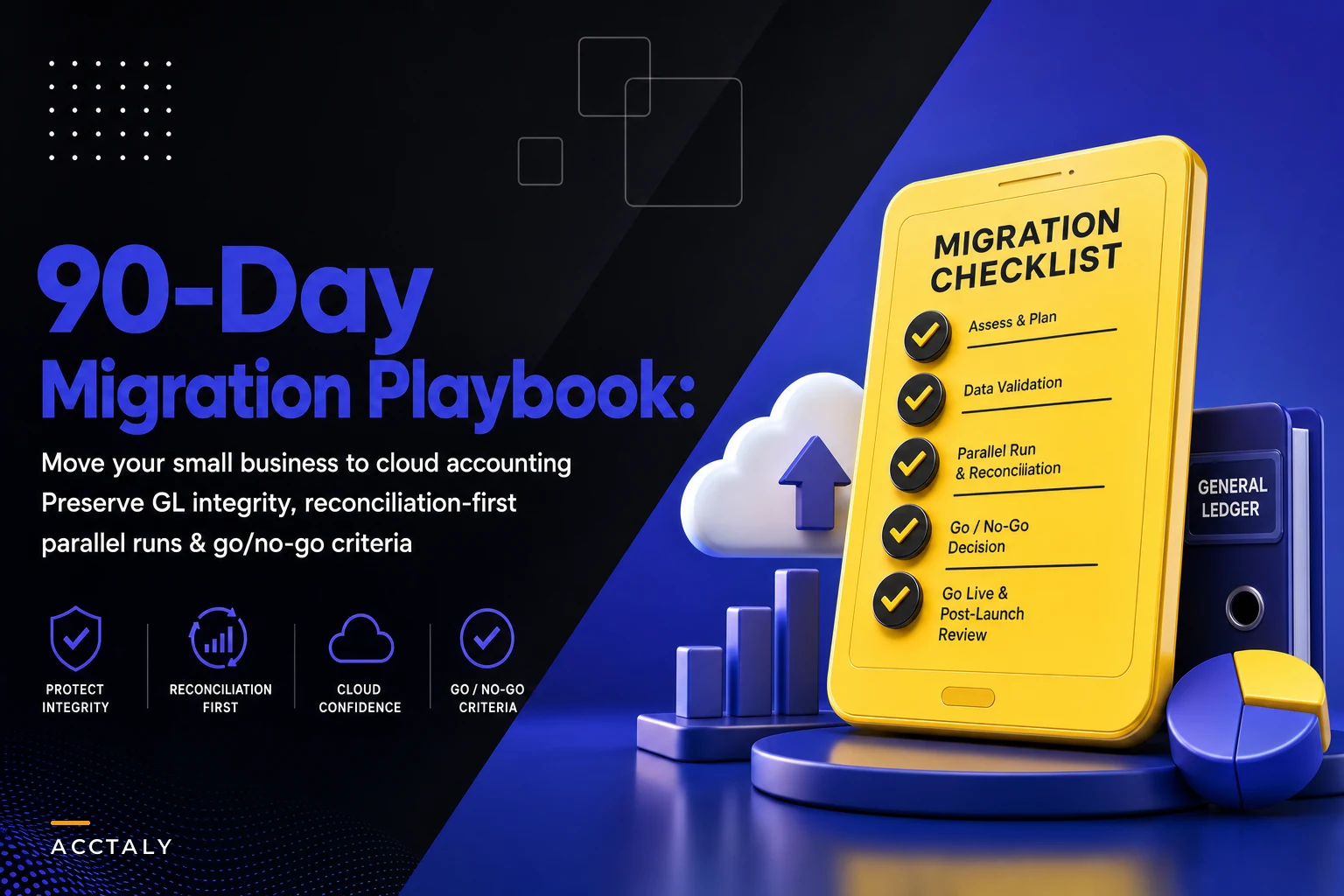

Most migrations don't fail on the day you flip the switch. They fail in week seven, when payroll posts to the wrong accounts, the bank feed double-counts a batch deposit, and your opening balance sheet is off by an amount nobody can explain. The software works fine. The migration was rushed.
This is a practical, sequenced plan for pulling off a cloud accounting migration without blowing up your monthly close. It assumes you already know why you're moving — you've outgrown desktop, you need multi-user access, you want real integrations — and you've cleaned enough of your data to not be hauling garbage across the fence. The goal here is sequencing and controls, because that's what actually determines whether your first close on the new system reconciles.
If you want this cloud accounting migration checklist for small business to hold up under an auditor or a lender, the approach is boring by design: cut over at a clean period boundary, run parallel long enough to actually trust the numbers, and don't connect everything at once.
Phase 0 (Days 1–15): Pre-selection and getting your house ready
You don't start a migration by shopping for software. You start by writing down what your current system is actually doing — because half of what you depend on isn't visible in the UI. It's in the bank rules you built three years ago, the custom report your accountant pulls every quarter, and the one spreadsheet that feeds your sales tax filing.
Document the real requirements, not the obvious ones
Before you talk to a single vendor, write down:
-
Entity structure. One legal entity? Three? A holding company with two operating LLCs? This single fact kills more "perfect" software choices than price does. Many SMB-tier plans handle multi-entity poorly or charge per-entity, and consolidation becomes a manual spreadsheet job.
-
Transaction volume per month. Count invoices, bills, bank lines, payroll runs. A business doing around 400 bank transactions a month has very different needs than one doing 8,000.
-
Who touches the books. Owner, bookkeeper, outside CPA, maybe an AP clerk. Each needs a different permission level, and some platforms price by user seat in ways that bite at 4–5 people.
-
Every downstream report. Sales tax returns, lender reporting packages, 1099 prep, board decks. If a report can't be reproduced on the new system, you've just created a new manual job.
-
Compliance anchors. Revenue recognition rules, any loan covenants tied to specific account balances, state-specific payroll tax setups.
Something worth paying attention to: the businesses that migrate smoothly are usually the ones where someone sat down and listed the integrations they're actually using versus the ones they think they use. A lot of "critical" connections turn out to be dead.
Set your cutover date backward from your close
Pick a cutover date that lands on a clean period boundary — ideally the first day of a fiscal quarter, or at minimum the first of a month after a completed, reconciled close. Then work backward. If you want to go live January 1, your opening balances come from a fully closed and reconciled December. Everything in this playbook keys off that date.
Phase 1 (Days 10–25): Vendor evaluation that goes past the demo
Demos are designed to look good. Your job is to break the demo. Here's what actually separates platforms once you're running real transactions.
Stop letting accounting slow your business down.
Acctaly automates your financial operations so you can focus on growth and compliance.
- Automated bookkeeping
- Real-time financial reporting
- Integrated tax management
No credit card required
Integration and API patterns
Ask vendors how they sync, not just whether they integrate. The difference between a real-time API push and a nightly CSV batch shows up in your reconciliation at month-end.
| Evaluation area | What to actually ask | Red flag answer |
|---|---|---|
| Bank feeds | Direct bank API or third-party aggregator? How are batch deposits handled? | "It imports everything as individual lines" (double-counting risk) |
| Payment processors | Do fees post gross-and-fee or net? Can payouts map to a clearing account? | "Deposits come in net, you reconcile manually" |
| API access | Is there a documented REST API on your plan tier? Rate limits? | API only on enterprise tier |
| Payroll | Native module or third-party? Does it post summarized or detailed JEs? | Posts one lump sum with no account detail |
| Multi-entity | True consolidation or export-and-combine? Intercompany eliminations? | "You run each entity and merge in Excel" |
| Data export | Can you get a full export, including historical detail, if you leave? | Vague answer / export locked behind support ticket |
That last row matters more than people think. The first question to ask any accounting vendor is how you'd get your data out. If leaving is hard, that tells you something about how they'll treat you once you're locked in.
The integration layer is where closes break
If you're running a POS, a payment processor, an inventory system, and payroll, the accounting platform becomes the hub where four data streams collide. Fragile connectors between those systems are one of the most common reasons a close drags into a multi-day fire drill. It's worth thinking through the integration architecture and data contracts between systems before you buy, because a cheaper platform with brittle connectors often costs more in reconciliation hours than it saves in subscription fees. The canonical ledger and data-lineage blueprint for SMB finance is worth reading if you want your new system to have clean lineage from source to GL from day one.
Phase 2 (Days 20–40): Chart of accounts mapping and data prep
This is where the real work lives, and it's the phase everyone underestimates.
Map the old COA to the new one — deliberately
Don't let the import tool auto-map your chart of accounts. It'll create duplicates, orphan sub-accounts, and map your "Merchant Fees" to three different places. Build the mapping by hand in a spreadsheet first.
A workable mapping sheet has these columns:
-
Old account number and name
-
Old account type
-
New account number and name
-
New account type
-
Action
MIGRATE,MERGE,RENAME,RETIRE -
Notes (why you're merging or retiring)
Migration is the best chance you'll ever get to clean up a bloated chart of accounts. If you've got 14 revenue accounts that should be 4 with classes or tags, fix it now. A reporting-first chart is far easier to build at migration than to retrofit later.
Opening balances come from a reconciled trial balance
Your opening balances are not a guess — they're the closing trial balance from your fully reconciled prior period. Export it. Verify total debits equal total credits. Then enter opening balances as a single dated journal entry (or via the platform's opening balance tool) as of the day before your go-live date.
A detail people miss: AR and AP opening balances must be entered as open invoices and open bills, not as lump-sum balances. If you import AR as a single $47,200 balance, you can't apply customer payments against individual invoices afterward. Import the open items individually.
Sample data-cleanup queries
SELECT LOWER(TRIM(vendorname)) AS normalizedname, COUNT() AS cnt, STRINGAGG(vendorid::text, ', ') AS ids FROM vendors GROUP BY LOWER(TRIM(vendor_name)) HAVING COUNT() > 1 ORDER BY cnt DESC;
SELECT txnid, txndate, amount, memo FROM transactions WHERE accountid IS NULL OR accountid = '' ORDER BY txn_date;
SELECT periodend, SUM(debit) AS totaldebits, SUM(credit) AS totalcredits, SUM(debit) - SUM(credit) AS difference FROM glentries WHERE periodend = '2024-12-31' GROUP BY periodend;
If that difference isn't zero, stop. Do not migrate until it is.
How much history do you actually bring over?
You don't need ten years of detail in the new system. A reasonable approach:
-
Opening balances as of cutover (mandatory)
-
Current fiscal year detail transaction-by-transaction (so YTD reports work)
-
Prior 1–2 years as summary balances, or kept in the old system as a read-only archive
Importing a decade of line-level history is the fastest way to slow down your new system and import old mistakes alongside the clean ones. Keep the archive elsewhere.
Phase 3 (Days 40–60): Integration sequencing — one connector at a time
The single biggest mistake in cloud accounting migrations is connecting payroll, POS, the payment processor, and inventory all in the same week, then trying to figure out why the numbers are wrong.
Connect them in order, verify each one reconciles for a few days, then add the next.
-
Bank feeds first. Nothing else matters if your cash doesn't tie. Connect the operating account, let a few days of transactions flow, confirm they match the bank portal exactly. Watch for duplicate imports on batch deposits.
-
Payment processor second. This is the one that quietly breaks things. Confirm that gross sales, processor fees, and net payouts post correctly — ideally through a clearing/undeposited-funds account so you can match a payout to the deposit that lands in the bank.
-
POS third (if you have one). POS should summarize daily sales into the GL, not dump every single transaction. Confirm the daily summary ties to the POS's own Z-report.
-
Payroll fourth. Payroll needs to post detailed journal entries — gross wages, employer taxes, withholdings, net pay — mapped to the right accounts. A lump-sum payroll entry is useless for reporting and brutal at year-end.
-
Inventory last. Inventory touches COGS, which touches your P&L. Connect it only once everything upstream is stable.
The logic here: each layer depends on the one before it reconciling cleanly. If payroll posts wrong and you've also just connected inventory, you won't know which integration caused the variance. One at a time makes every problem diagnosable.
Each stage in this sequence requires a reconciliation sign-off before you move to the next connector. Think of it as a gate — you don't open the next door until you can confirm the current one closes cleanly.
> Integration Sequencing Flow > Bank Feeds → Payment Processor → POS → Payroll → Inventory > Each stage requires reconciliation sign-off before the next connector is activated.
Use a clearing account for payment-processor payouts so you can match deposits to payouts easily.
Here's a visual of the integration sequencing flow.
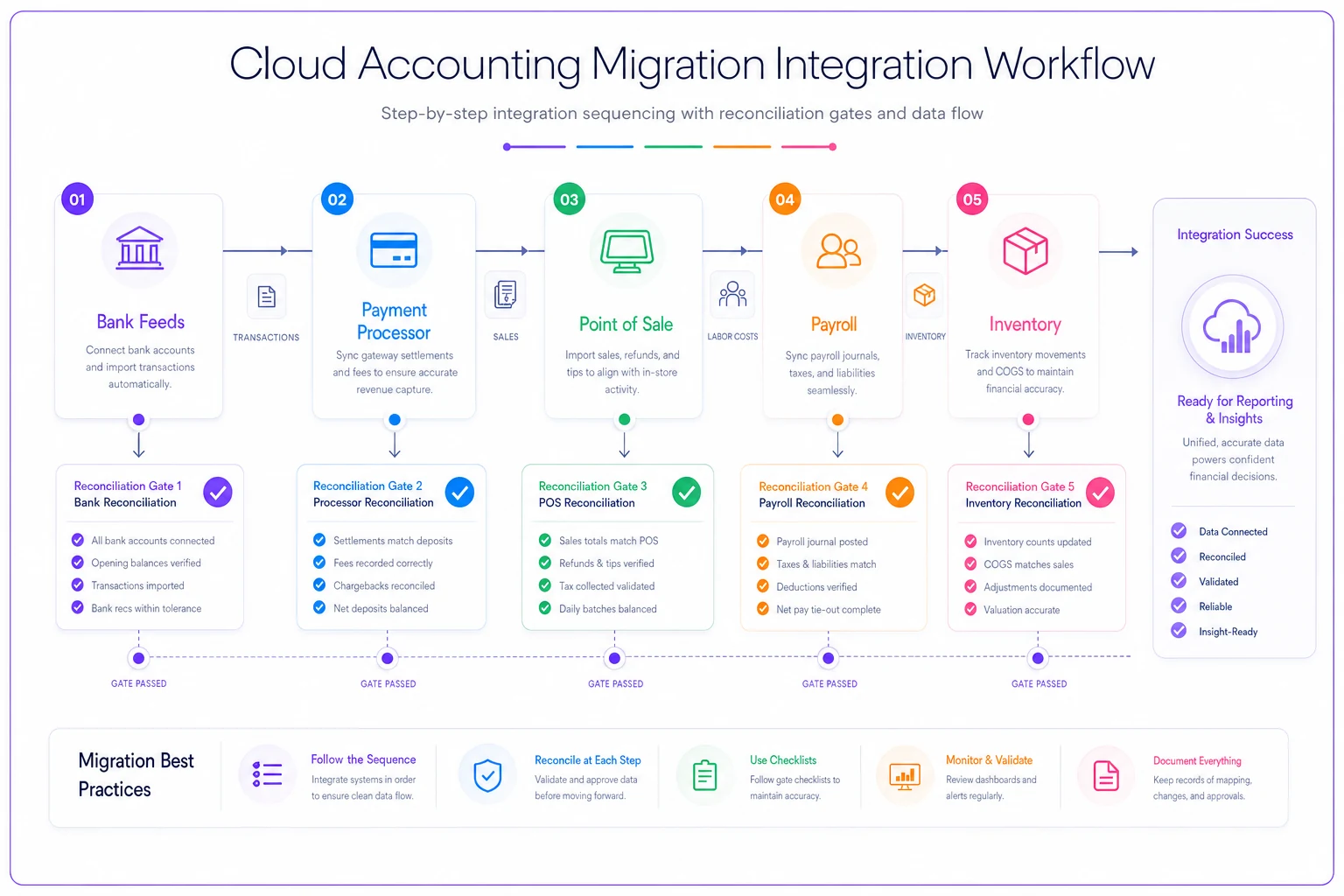
Think of it as a gate — you don't open the next door until you can confirm the current one closes cleanly.
Phase 4 (Days 55–80): Parallel run and reconciliation controls
This is the phase that protects your close. For at least one full month — ideally two — you run the old system and the new system in parallel. Same transactions, both places, then compare.
What "parallel run" actually means in practice
Not "both systems are open" — it means you're actively reconciling them against each other. Every day, or at minimum weekly:
-
Bank balance on both systems ties to the actual bank statement
-
AR total matches between systems and ties to your open invoice list
-
AP total matches and ties to open bills
-
Revenue YTD within a defined tolerance
-
Payroll liabilities match to the penny (tax authorities don't do tolerances)
Set a threshold for investigation — any account variance over $50 gets researched same-day. Small unexplained differences compound fast. A $12 processor-fee misclassification in week two becomes a $300 mystery by month-end if nobody chases it.
A reconciliation workflow that holds
Pull the new-system bank reconciliation report and the old-system one side by side. Any line that appears in one but not the other goes on an exceptions list with a name next to it. Transfer batches and payment-processor payouts get matched to the clearing account first, then to the bank deposit. Anything still unexplained after 24 hours escalates to whoever owns the close. At week's end, you sign off that both systems agree before moving forward.
This kind of discipline is what keeps the first "real" close from turning into a three-day fire drill.
Don't skip parallel to save money
The pressure to end parallel early is real — running two systems feels redundant and you're paying for both. But the parallel run is your only chance to catch a systematic error (a wrong mapping, a double-counting feed) before it's the only record you have. Cut it short and you're debugging your financials with no clean comparison point.
Phase 5 (Days 70–85): Access, delegation, and permissions
A migration is the right moment to fix access, because you're rebuilding the permission structure from scratch anyway. Don't recreate the old habit where everyone's effectively an admin.
Set roles before go-live, not after
-
Owner / approver — sees everything, approves payments, but ideally doesn't also enter the bills they approve
-
Bookkeeper — enters transactions, runs reconciliations, no ability to change the chart of accounts without sign-off
-
AP/AR clerk — scoped to their function only
-
Outside CPA — read/report access plus adjusting-entry rights, usually time-boxed around close and tax season
-
Admin — one or two people, controls the integrations and user list
The separation that matters most on a small team: whoever enters payments shouldn't be the sole person who approves and releases them. Even in a three-person finance function, you can split enter from approve. If you're thinking through how to structure this without over-engineering it, an internal Finance-as-a-Service operating model gives you a cleaner way to assign roles and responsibilities than just handing out logins.
Roles should be documented somewhere — even a one-page internal reference beats "ask whoever set this up." That document also becomes useful when you onboard a new bookkeeper or rotate your CPA.
Phase 6 (Days 80–90): Rollout, training, and go-live
Training isn't a one-hour walkthrough. It's role-specific and task-based.
-
Bookkeeper
full workflow training — bank rec, entering bills, running the close checklist on the new system
-
Approvers
just the approval and reporting flows they'll actually touch
-
Everyone
where things live and who to ask when something looks off
Build a short, written close checklist specific to the new system before your first solo month-end. Screenshots help. The person who did the migration won't always be the person running the close in month four.
Go-live day
Keep it boring. Confirm opening balances match the signed-off trial balance, confirm all approved integrations are live and reconciling, lock the old system to read-only (don't delete it — archive it), and run your first week on the new system with daily bank checks.
The goal on go-live day is a quiet, uneventful handoff. If it feels anticlimactic, you did it right.
KPIs to track through the migration
A few numbers worth monitoring to know whether the migration is actually working:
-
Days to close — compare pre-migration vs. first three closes on the new system. Expect it to get worse before it improves around month three.
-
Reconciliation variance — dollar gap between systems during parallel; should trend toward zero.
-
Unreconciled items aging — count of exceptions older than 48 hours.
-
% of transactions auto-categorized correctly — tells you whether your bank rules and mappings are holding up.
-
Integration sync failures per week — a rising number means a connector is fragile.
| KPI | What it tells you | Target during migration |
|---|---|---|
| Days to close | Whether the new system is actually faster over time | Improving by month 3 |
| Reconciliation variance | Health of the parallel run | Trending toward $0 |
| Unreconciled items aging | Whether exceptions are being chased | 0 items older than 48 hours |
| Auto-categorization rate | Bank rule and mapping quality | Rising week-over-week |
| Sync failures per week | Connector stability | Zero or declining |
If you're deciding how much to invest in the connectors and automation around this new system, it's worth scoring them deliberately rather than buying every integration on offer. This portfolio scoring framework for finance automation helps separate the connectors that save real hours from the ones that just add sync points to babysit.
Risks and mitigations
Below is a summary of common risks and how to mitigate them.
| Risk | How it shows up | Mitigation |
|---|---|---|
| Opening balance sheet out of balance | Equity plug appears, totals don't tie | Only migrate from a fully reconciled, balanced trial balance |
| Batch deposit double-counting | Bank balance higher than reality | Use a clearing account; verify processor posts gross + fee |
| Payroll posts as lump sum | Can't break out wages vs. taxes at year-end | Require detailed payroll JEs before go-live |
| Parallel run cut short | Systematic error found too late | Minimum one full month parallel, two preferred |
| Too many integrations at once | Variances you can't diagnose | Connect one connector, verify, then add next |
| AR/AP imported as lump balances | Can't apply payments to invoices | Import open items individually |
| Everyone's an admin | No audit trail, control gaps | Set role-based access before go-live |
| COA auto-mapped | Duplicate/orphan accounts, broken reports | Map chart by hand, review merges manually |
Use these mitigations as checkpoints during migration planning.
When this 90-day timeline is right — and when it isn't
This pace makes sense when: you have a reasonably clean prior-year close, under roughly 5,000 transactions a month, a straightforward entity structure, and someone who can own the project a few hours a week.
Stretch the timeline when: you're multi-entity with intercompany activity, you have messy historical data that still needs cleanup, or you're migrating during your busy season. Multi-entity consolidation alone can add weeks — don't compress it.
Don't migrate right now if: your current books aren't reconciled, you're inside two weeks of a tax deadline, or your peak revenue season is about to hit. Migrating on top of unreconciled books just moves the mess into a new system and makes it harder to untangle, because now you don't have a clean baseline to compare against.
A quick real-world picture
A regional e-commerce business — three sales channels, a Shopify POS, Stripe and PayPal processing, and about 2,800 transactions a month — moved off desktop accounting over a quarter. Their first attempt had failed because they'd connected all four integrations in one weekend and spent six weeks unable to explain a recurring ~$1,900 monthly variance (it was net-vs-gross payment posting, buried under three other issues).
The second time, they cut over at the start of a quarter, mapped the chart by hand (collapsing 11 revenue accounts down to 5), connected one integration a week, and ran parallel for two months. Their first independent close on the new system took around nine days — slower than their old four-day close — but by month three they were closing in roughly five days with the variance gone.
The thing that made the difference wasn't the software. It was refusing to connect everything at once and refusing to end parallel early.
Bringing it together
A cloud accounting migration goes wrong in predictable ways: unbalanced opening entries, double-counted deposits, lump-sum payroll, and too many integrations lit up at once with no clean baseline to debug against. Every one of those is preventable with sequencing and a parallel run — not with a fancier platform.
Work backward from a clean close date. Map the chart deliberately. Connect one connector at a time and make each one reconcile before adding the next. Run parallel long enough to actually trust the numbers. Do that, and your first real close on the new system will be a normal month-end — not the disaster that sends people crawling back to the old desktop file.
Ready to take control of your finances?
Join over 2,000 businesses using Acctaly to simplify accounting, accelerate cash flow, and ensure tax readiness.