


Moving from QuickBooks to NetSuite feels like the answer to every operational headache. Better reporting, automated workflows, real-time visibility. Then migration day comes, and your new $40k system is filled with six years of duplicate vendors, orphaned journal entries, and transactions coded to "Ask accountant later."
The migration consultant tells you they'll "map everything over." What they don't mention is that mapping garbage data just gives you organized garbage. Those 47 versions of "Amazon" as a vendor? They're all coming with you. The miscoded expenses from 2019? Still miscoded, just in a fancier system.
Why accounting migrations turn into operational disasters
Most migrations work like this: the implementation team exports your entire chart of accounts—all 843 accounts you've accumulated over the years. They run a script to move historical transactions. They map your old account codes to new ones. Then they hand you the keys to your new system, which now runs slower than your old one because it's processing twice as much junk.
Your controller spends the next three months cleaning up migration errors instead of closing the books. Customer invoices get lost in duplicate records. Vendor payments fail because the system can't figure out which of the seven "Office Depot" entries to use. That promised efficiency gain? You're now paying overtime to fix problems that didn't exist before.
The core mistake is treating migration as a technical project instead of an operational reset. Moving data is the easy part. Knowing what data deserves to move—that's where businesses fail.
Building your prioritization matrix: what moves, what stays, what dies
Not all accounting data has equal value. Your 2018 utility bills? Probably not mission-critical. Active customer payment histories? Essential. The prioritization matrix helps you make these calls systematically instead of emotionally.
Stop letting accounting slow your business down.
Acctaly automates your financial operations so you can focus on growth and compliance.
- Automated bookkeeping
- Real-time financial reporting
- Integrated tax management
No credit card required
Create four categories for every data type:
Critical for operations: Current vendor records, active customer accounts, open AR/AP, current year transactions, anything affecting cash flow or compliance. This data gets full attention—cleaned, verified, and mapped perfectly.
Historical reference: Prior year financials, closed project data, archived vendor records. This moves but doesn't need perfection. Basic cleanup only.
Compliance archive: Old tax records, audit trails, regulatory filings. Keep these in the old system as read-only or export to cold storage. No need to clog your new system.
Delete entirely: Duplicate entries, test transactions, abandoned projects, that vendor you used once in 2017. Be ruthless here.
For a typical small business with five years of data, roughly 30% falls into "critical," 25% into "historical," 35% into "compliance archive," and 10% can disappear forever. Those percentages shift based on your industry—healthcare businesses might archive more for compliance, while a three-year-old startup might have 60% critical data.
The test-sample reconciliation method that catches problems early
Running a test migration on your full dataset is like trying to find a needle in a warehouse full of haystacks. Instead, use stratified sampling to validate your migration logic before you commit.
Pull 100 transactions from each major category: sales, purchases, payroll, journal entries. Include edge cases—foreign currency transactions, multi-location transfers, split-coded expenses. Run these through your migration process first.
What you're checking:
Account mapping accuracy—does "5150 - Contract Labor" in your old system correctly map to "6234 - Professional Services" in the new one? Check every single mapped account in your sample.
Balance preservation—do your debits still equal credits after migration? Sum your sample transactions before and after. Any variance means your mapping logic has gaps.
Relationship integrity—does that customer payment still link to the correct invoice? Can you trace a purchase order through to payment?
A consulting firm migrating from QuickBooks to Sage found their test sample showing vendor payments moving correctly but losing their expense category detail. Turned out their mapping logic only preserved the top-level account. Catching this on 100 transactions saved them from miscoding 45,000 historical entries.
This workflow illustrates the test-sample migration process.
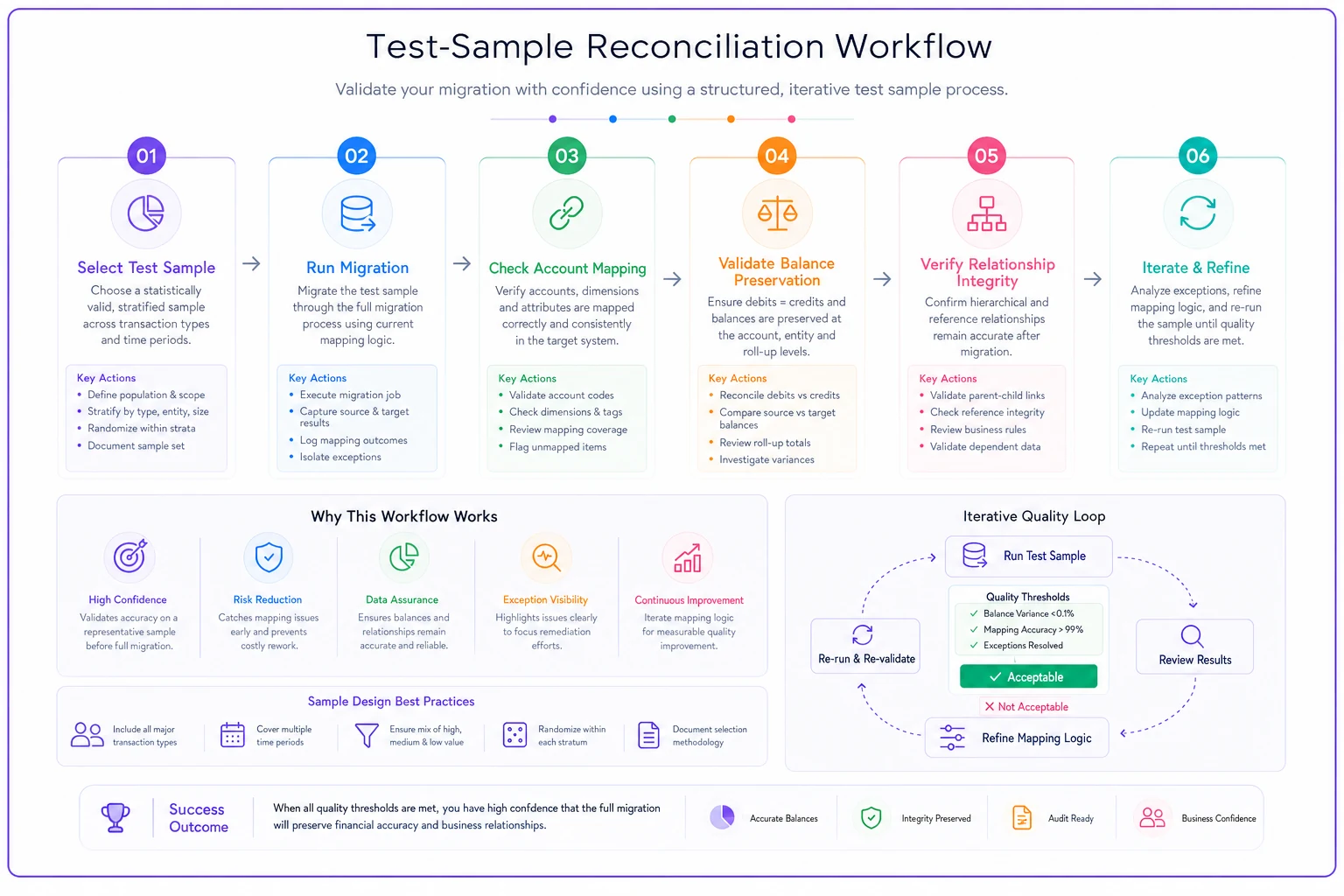
Run the sample, fix mappings, and iterate until the sample results match expectations.
COA remapping rules that prevent post-migration chaos
Your existing chart of accounts probably grew organically, with new accounts added whenever someone couldn't find the right category. The result? Overlapping accounts, inconsistent hierarchies, and expense categories that make sense to exactly one person who left the company two years ago.
Migration is your chance to fix this mess, but only if you build clear remapping rules upfront. Start with your reporting needs, then work backward to account structure.
Create a mapping spreadsheet with five columns:
| Old Account | Old Name | New Account | New Name | Notes/Exceptions |
|---|---|---|---|---|
| 5100 | Office Supplies | 6200 | Office & Administrative | Combine w/ 5110, 5125 |
| 5150 | Contract Labor | 6234 | Professional Services | Include temp staffing |
| 7200 | Misc Income | 4900 | Other Revenue | Review all items first |
For overlapping accounts, establish clear combination rules. Those three different "Marketing" expense accounts? They all map to one "6100 - Marketing & Advertising" account in the new system. Document why you're combining them—this helps when someone asks six months later why their favorite account disappeared.
Suspense accounts: That "Miscellaneous" account with $47,000 of random transactions? Every item needs individual review and proper coding before migration. No dumping grounds in the new system.
Inactive customer/vendor accounts: If they haven't transacted in 18 months, they become archived records, not active accounts. Your new system shouldn't show 3,000 vendors when only 200 are active.
Project or grant tracking: If your old system tracked these with sub-accounts, your new system might use dimensions or classes instead. Map the tracking method, not just the account.
When combining overlapping accounts, add a short 'Why combined' note in the mapping spreadsheet to prevent future confusion.
Inter-company accounts: These often break during migration because the entity relationships change. Map these manually and test extensively.
Your post-migration triage plan for the first 30 days
Even perfect migrations create noise. Users can't find familiar accounts. Reports look different. Workflows that took two clicks now take three. Without a triage plan, these minor issues escalate into operational paralysis.
Week 1: Daily reconciliation checks
Run your key operational reports every morning—cash position, AR aging, AP summary. Compare to your pre-migration benchmarks. Any variance over 1% gets immediate investigation. Set up a dedicated Slack channel or email alias for migration issues. Response time target: two hours for operational blockers, 24 hours for everything else.
Week 2-3: Process validation
Test every critical workflow with real transactions. Can you actually pay vendors? Do customer invoices generate correctly? Does payroll still run? Have each team member process at least one full transaction in their area. Document every friction point, but don't fix anything yet—just document.
Week 4: Prioritized fixes
Sort your issue list by impact and effort. Quick fixes that affect many users go first. Complex problems affecting few users go last. That report formatting issue the CEO wants fixed? If it doesn't block operations, it waits.
Monthly close will be your first real test. Run a parallel close if possible—complete the process in both old and new systems. The numbers won't match perfectly (timing differences, cutoff issues), but material variances indicate migration problems.
Real scenario: How a property management company avoided migration disasters
A 40-person property management company operating across three states decided to migrate from QuickBooks to Yardi after struggling with multi-entity consolidation. They managed 400 properties with roughly $18M in annual rent collection.
Their QuickBooks file had eight years of data, including:
-
1,247 chart of accounts (only 200 actively used)
-
14,000 vendor records (3,800 duplicates)
-
6 different ways to record maintenance expenses
-
Properties tracked using classes, locations, AND custom fields
Using the prioritization matrix, they identified only 35% of their data as migration-critical. Current tenant records, active leases, and two years of transaction history made the cut. Everything else went to archive storage.
Their test sample revealed that security deposit liabilities weren't mapping correctly—the migration logic treated them as revenue. Catching this on 50 test transactions prevented misclassifying $2.8M in tenant deposits.
The COA remap consolidated those 1,247 accounts down to 340 standardized accounts aligned with property management industry standards. Maintenance expenses now had one consistent coding structure across all properties.
Post-migration noise lasted exactly 17 days instead of the typical three to six months. They refused to migrate problems. Their May close took four days (down from seven), and property-level reporting actually worked for the first time in years.
Leveraging workflow automation during migration cleanup
The manual reconciliation and data validation required during migration creates an interesting opportunity. While you're reviewing every process and transaction type anyway, it's the perfect time to identify where AI-powered automation could eliminate recurring cleanup work.
Modern accounting platforms can now use pattern recognition to catch duplicate vendors before they're created, auto-code transactions based on historical patterns, and flag anomalies in real-time instead of during month-end. These tools work best when they're trained on clean, well-structured data—exactly what you're creating through your migration cleanup.
The automation question shouldn't be "what can we automate?" but rather "what manual cleanup are we doing repeatedly that shouldn't exist?" Every duplicate vendor you merge during migration represents a control that should exist going forward. Every miscoded transaction you fix suggests a rule that could prevent future errors.
Consider building your automation roadmap alongside your migration plan. As you document each cleanup task, note whether it's a one-time fix or an ongoing problem. Ongoing problems become your automation priorities post-migration.
Making the migration decision: when cleaning isn't worth it
Sometimes the smartest migration strategy is not migrating at all. If your cleanup effort exceeds three months or 400 hours of work, you might be better off starting fresh.
This makes sense when:
-
Your business model has fundamentally changed (pivot from services to SaaS)
-
You're spinning off or merging entities
-
Historical data has no operational value
-
Compliance requirements allow for archived-only historical records
A digital agency that pivoted from project work to recurring retainers chose to migrate only nine months of data. Everything else stayed in QuickBooks as a read-only archive. They saved 200 hours of cleanup work and launched their new system in six weeks instead of four months.
The fresh-start approach requires courage and clear communication with stakeholders. But carrying forward years of compromised data just to say you have "complete history" often creates more problems than it solves.
Your accounting data migration checklist
Before migration kickoff:
-
Complete your prioritization matrix for all data types
-
Document current pain points that migration should solve
-
Set measurable success criteria (close time, error rates, user satisfaction)
-
Assign data owners for each category
During test migration:
-
Run test samples for each transaction type
-
Validate all COA mappings
-
Check relationship preservation
-
Document every issue, no matter how small
Pre-production migration:
-
Clean identified data issues in source system
-
Archive non-critical data
-
Freeze non-essential changes
-
Communicate timeline to all users
Post-migration:
-
Daily reconciliation for week one
-
Process validation for weeks two to three
-
Issue triage and fixes in week four
-
Parallel monthly close if possible
Three months post-migration:
-
Review against success criteria
-
Document lessons learned
-
Archive or delete old system access
-
Celebrate (seriously, migrations are hard)
Your new accounting system is only as good as the data you put into it. Clean first, migrate second, and automate third. Your future finance team will thank you.
Your new accounting system is only as good as the data you put into it. Clean first, migrate second, and automate third. Your future finance team will thank you.
Ready to take control of your finances?
Join over 2,000 businesses using Acctaly to simplify accounting, accelerate cash flow, and ensure tax readiness.