


Unapplied cash is one of those problems that doesn't scream for attention until it's already eaten weeks of your AR clerk's time. A payment lands, nobody's sure which invoices it covers, so it gets parked in a suspense account "to deal with later." Later never comes with a clean head. By the time anyone looks, there are 40 line items in the holding bucket, a customer is disputing a late fee on an invoice they swear they paid, and your DSO report is lying to you.
The root cause almost always comes back to the same thing: no written, deterministic rulebook for how incoming money gets matched to open invoices. Everything runs on the memory and instinct of whoever happens to be applying cash that day. That works fine until someone goes on vacation, volume doubles, or a big customer starts paying three invoices with one lump ACH and no remittance detail.
This post is about fixing that specific problem — building a cash application rulebook for SMB AR teams that's precise enough to run the same way every time, flexible enough to handle messy mixed-payor remits, and honest enough to kick genuinely ambiguous items into an exception queue instead of forcing a wrong match.
Why mixed-payor remits break naive matching
The simple case is easy: customer pays one invoice, amount matches to the penny, their name is on the wire. Any system handles that. The trouble starts when reality shows up.
A typical scenario looks like this. A commercial customer sends a single $14,280 ACH. Their remittance email lists seven invoices. Two have short-pays because of a disputed shipping charge. One invoice number on the remittance is transposed — they wrote 10492 instead of 10429. And the payor name on the bank feed reads "CORP SVCS LLC — AP DEPT," which matches nothing in your customer master because you have them saved as "Corporate Services, LLC."
-
An amount that doesn't tie to any single invoice
-
A reference list that's partly wrong
-
A payor name that's unrecognizable to your system
What actually happens across a lot of AR operations is people solve this with heroics — opening the remittance PDF, cross-checking the portal, emailing the customer — and then applying it manually without writing down how they decided. So the next time the same mess arrives, the next person starts from zero. No accumulated logic, no trail. That's the real failure, not the individual match.
A deterministic rulebook fixes this by deciding, in advance and in writing, what signal wins when signals conflict.
The precedence stack: amount, date, reference
The core of the rulebook is a precedence order. When you have multiple possible matches, which factor decides? Most teams who struggle with this have never actually ranked them. Here's a precedence stack that holds up well in practice.
Stop letting accounting slow your business down.
Acctaly automates your financial operations so you can focus on growth and compliance.
- Automated bookkeeping
- Real-time financial reporting
- Integrated tax management
No credit card required
| Priority | Signal | What it does | When it wins |
|---|---|---|---|
| 1 | Explicit reference | Invoice number(s) on the remittance | When the reference is clean and sums to the payment amount |
| 2 | Amount | Payment total vs. open invoice combinations | When no clean reference exists but one invoice (or a small set) matches exactly |
| 3 | Date proximity | Payment date vs. invoice due dates | Tiebreaker when multiple invoices share the same amount |
| 4 | Payor identity | Mapped customer from bank feed name | Narrows the candidate pool before any of the above |
The order matters more than any single rule. A good explicit reference should beat a tempting amount match — and there's a real reason for that. Amount matches produce false positives constantly. If a customer has three open invoices at $1,200 each, an incoming $1,200 payment "matches" all three equally. Amount alone can't choose. But if the remittance says "INV-10429," that reference overrides the amount ambiguity entirely, even if 10429 is for $1,180 and there's a separate open invoice sitting at exactly $1,200.
The mistake people make is letting amount win because it's the cleanest-looking number. Exact-dollar matches feel authoritative. They're often wrong.
A few precedence rules worth writing down explicitly
-
A reference that sums to the payment within a defined tolerance (say ±$0.50 for rounding) auto-applies at the referenced invoices.
-
If the reference is present but the sum is off by more than tolerance, do not force it — route to exceptions with the near-miss flagged.
-
Amount-only matches auto-apply only when exactly one invoice combination fits. More than one combination = exception, never a guess.
-
Date proximity is a tiebreaker, not a primary rule. Never apply cash based on date alone.
Date proximity is a tiebreaker, not a primary rule. Never apply cash based on date alone.
Fuzzy matching, with thresholds you can actually defend
Payor names and invoice references are where fuzzy matching earns its keep — and also where people cause damage by setting thresholds too loose.
The two places you need fuzzy logic:
-
Payor name → customer master (bank feed strings are ugly)
-
Reference string → invoice number (transpositions, prefixes, OCR noise)
For names, a normalized Levenshtein or token-sort ratio works fine. The key is picking an auto-accept threshold that's conservative and a review band below it. What's held up well in practice:
-
Score ≥ 0.92
auto-map to the customer
-
Score 0.80–0.91
suggest the mapping, route to exception for one-click confirm
-
Score < 0.80
no mapping, exception
Here's a sanity-check pivot you can run on your own history before you trust any threshold. Pull every manually-applied payment from the last 90 days, compute the fuzzy score between the raw bank name and the customer you eventually applied it to, and look at the distribution:
SELECT CASE WHEN simscore >= 0.92 THEN '0.92+' WHEN simscore >= 0.80 THEN '0.80-0.91' WHEN simscore >= 0.70 THEN '0.70-0.79' ELSE 'under 0.70' END AS scoreband, COUNT(*) AS payments, SUM(amount) AS dollars, COUNT(DISTINCT customerid) AS distinctcustomers FROM appliedpayments ap JOIN namesimilarity ns ON ap.paymentid = ns.paymentid WHERE ap.applied_date >= DATEADD(day, -90, GETDATE()) GROUP BY 1 ORDER BY 1;
If you find a big chunk of correctly-applied dollars sitting in the 0.80–0.91 band, that tells you auto-accepting only at 0.92+ is safe but leaves real work on the table — which is exactly why that band becomes your one-click review queue rather than an auto-apply zone.
For invoice references, don't use a generic string distance. Build reference matching around the structure of your invoice numbers. If your invoices are INV-#####, strip the prefix, then compare the numeric core with edit distance ≤ 1 to catch single transpositions. Note that 10492 vs 10429 is a two-digit swap — distance 2 — so decide deliberately whether you want to catch swaps or only single-character errors. Catching more means more false positives. That's a business decision, not a technical one.
A reference-match pivot to tune tolerance
SELECT editdistance, COUNT() AS candidatematches, SUM(CASE WHEN wascorrect = 1 THEN 1 ELSE 0 END) AS confirmedcorrect, ROUND(100.0 SUM(CASE WHEN wascorrect = 1 THEN 1 ELSE 0 END) / COUNT(*), 1) AS precisionpct FROM referencematchlog GROUP BY editdistance ORDER BY editdistance;
Run this and you'll usually see precision fall off a cliff at a specific edit distance. That cliff is your cutoff. Setting it past the cliff means you're auto-applying guesses.
Split allocation within a single payment
Mixed-payor and mixed-invoice remits need rules for how a payment gets split across invoices, not just which invoices. Three scenarios cover most of it:
-
Exact reference allocation
remittance lists invoices and amounts per invoice; allocate exactly as stated if the total ties.
-
Reference without per-line amounts
remittance lists invoice numbers but not how much went to each. Allocate oldest-first against those specific invoices until the payment is exhausted.
-
Short-pay on a referenced invoice
apply the stated partial, then open a deduction/short-pay record on the remaining balance — never leave it silently underapplied.
That third one is where revenue quietly leaks. A $14,280 payment against $14,500 of invoices isn't "close enough." The $220 gap is either a dispute, a discount, or a mistake, and each gets handled differently. Forcing the application to zero out the balance hides the problem and corrupts your aging. If you want your receivables aging to actually drive collections decisions, the data underneath has to be clean — the same principle that separates reporting metrics that drive decisions from vanity numbers.
Designing the exception queue (and its SLA)
The whole point of a deterministic rulebook is that it refuses to guess. So the exception queue isn't a failure state — it's the pressure-release valve that keeps your auto-application honest. The design question is: how fast do exceptions have to clear before they become a liability?
An exception queue without an SLA turns back into a suspense dumpster. The fix is to tier exceptions by why they landed there and set a clock on each.
| Exception type | Typical cause | SLA target | Owner |
|---|---|---|---|
| Unmapped payor | New customer, bad name string | 1 business day | AR clerk |
| Reference near-miss | Transposed/partial invoice # | 1 business day | AR clerk |
| Amount ambiguity | Multiple matching invoice sets | 2 business days | AR clerk → lead |
| Short-pay / overpay | Dispute, discount, duplicate | 3 business days | AR lead + collections |
| No match at all | Wrong customer, prepayment | 3 business days | AR lead |
A few things that make these SLAs stick instead of slipping:
-
Age the queue by item, not by batch. The clock starts when the item lands, not when someone opens the batch.
-
Escalate automatically. Anything past SLA bumps to the lead's view and shows up in the weekly review. No manual chasing.
-
Cap the queue size, not just the age. If the unmapped-payor queue regularly exceeds 15 items, that's a signal your customer master mapping is stale — not that your team is slow.
Start the SLA clock the moment the item lands in the exception queue, not when someone opens the batch.
The pattern worth noticing: most exception queues don't fail because items are hard. They fail because nobody owns the clock. An item that needs a two-minute email sits for eleven days because it belongs to everyone and therefore no one.
The weekly clean-up cadence for a small AR team
For a one-to-three person AR function, a daily deep-clean isn't realistic and you'll resent it by Wednesday. A weekly cadence with a hard daily floor works better. The floor keeps the queue from compounding; the weekly session does the structural cleanup.
Daily (15 minutes, non-negotiable):
-
Clear all same-day auto-apply exceptions in the 1-day SLA tiers (unmapped payor, reference near-miss)
-
Confirm or reject one-click fuzzy suggestions
Weekly (60–90 minutes):
-
Work the aged exception list, oldest first, until everything past SLA is cleared or escalated.
-
Review every short-pay/overpay opened that week and route to collections or dispute with a note.
-
Update the customer master for any payor name that hit the fuzzy queue more than once — add the bank string as an alias so it auto-maps next time.
-
Scan the suspense/unapplied account balance and confirm it's trending toward zero, not drifting up.
-
Pull the week's auto-apply precision and false-match rate; if false matches climbed, tighten a threshold before next week.
That third step is the compounding one. Every alias you add means one fewer exception forever. Teams that treat the customer master as a living artifact see their exception volume drop week over week. Teams that don't re-solve the same five ugly payor names every Monday.
Keeping the unapplied balance near zero also matters well beyond AR tidiness — unapplied cash distorts your available-liquidity picture, which is exactly the kind of noise that undermines a 13-week rolling cash forecast. Money that's technically in the bank but not applied to an invoice sits in an awkward limbo where it's neither clearly collected nor clearly owed.
How the matching flow actually works
Once you have a precedence stack and fuzzy thresholds defined, it helps to see the full decision path laid out as a process rather than a set of rules in a table. Here's how a clean rulebook moves each incoming payment from bank feed to either auto-applied or exception queue:
Payment received from bank feed │ ▼ Normalize payor name → fuzzy match against customer master │ ┌────┴─────────────────────────────────────────┐ │ │ Score ≥ 0.92 Score < 0.80 or 0.80–0.91 (auto-map customer) (exception: unmapped payor / one-click confirm) │ ▼ Check remittance for explicit invoice reference(s) │ ┌────┴───────────────────────────────────────────┐ │ │ Reference present No reference │ │ Sum ties to payment (±$0.50)? Amount matches exactly one invoice combo? ┌────┴──────┐ ┌─────────┴──────────┐ Yes No Yes No │ (exception: Auto-apply (exception: Auto-apply near-miss amount match amount ambiguity) exact ref) flagged) │ ▼ Short-pay or overpay on any line? ┌────┴──────┐ Yes No │ │ Open Close deduction invoice(s) record fully
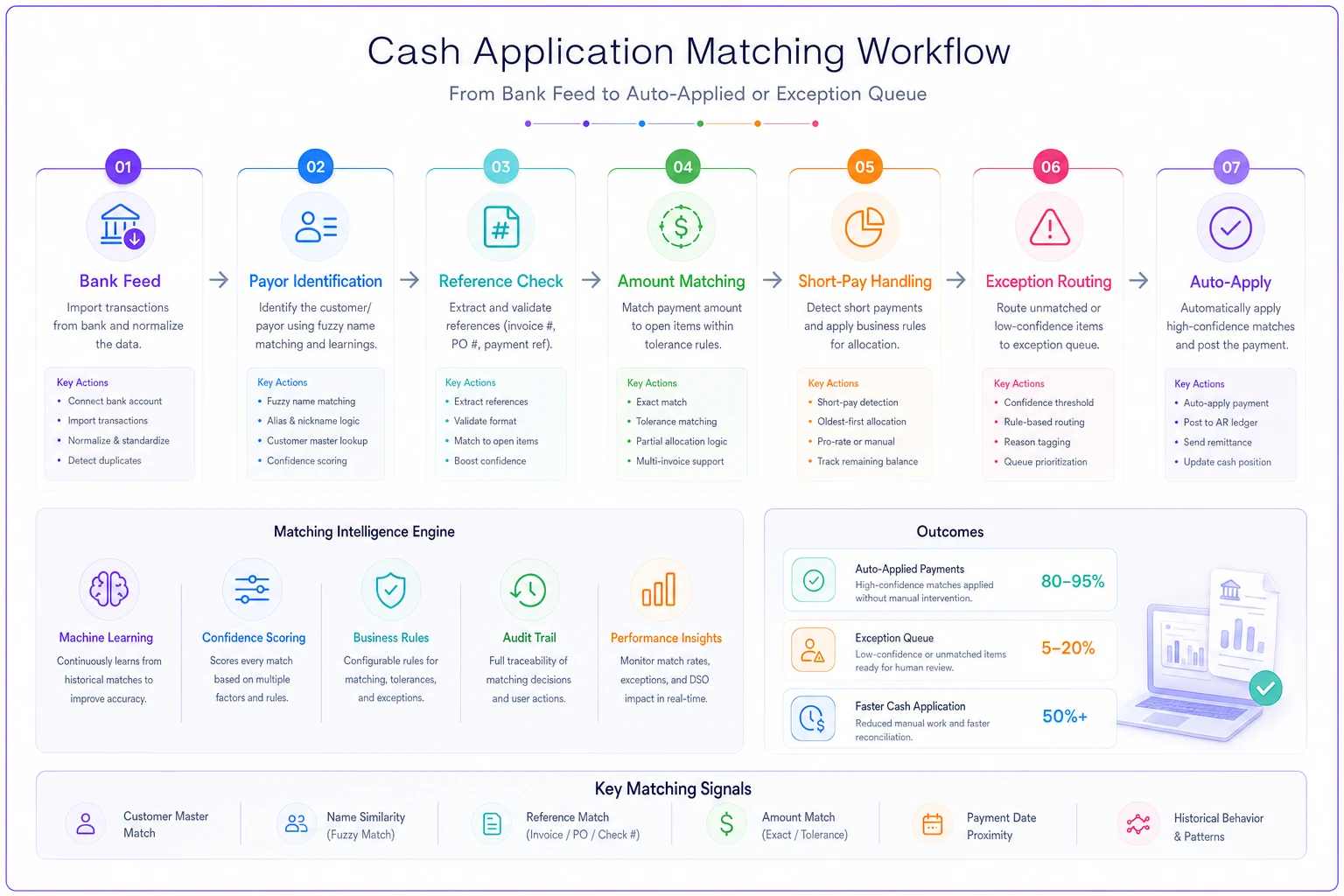
This diagram maps the decision path above.
The key thing this diagram makes visible is where exceptions are supposed to come from. If most of your exceptions are clustering at "amount ambiguity" rather than "near-miss reference," that's a sign your customers aren't including invoice numbers on remittances — which is a collections communication problem, not a matching-logic problem. Knowing where in the flow exceptions originate tells you where to fix things upstream.
A real scenario
A regional commercial cleaning company, roughly $6M in revenue, billed about 180 active commercial accounts monthly. Mostly ACH, with a lot of lump payments covering multiple buildings on one invoice run. Their one-person AR function was carrying a suspense balance that floated between $40k and $70k, and month-end close routinely stalled a day or two waiting for cash application to catch up.
The core issues were textbook: no written precedence (amount was effectively winning by default, producing wrong matches on the many same-dollar recurring invoices), payor names that never matched because property-management companies paid under building-level LLC names, and an "I'll get to it" suspense pile with no clock.
They wrote a precedence stack — reference over amount — set fuzzy thresholds from their own 90-day history, built the five-tier exception queue with SLAs, and started adding bank-string aliases to the customer master every week.
The change wasn't dramatic in week one. By around the six-to-eight week mark, the suspense balance was holding under $10k, the weekly exception session had shrunk from a painful two hours to about 40 minutes, and close stopped waiting on cash app. The biggest surprise to the owner wasn't the time saved — it was that two "slow-paying" accounts turned out to have been paying on time all along. The payments had just been sitting unapplied, making the aging report lie.
When a formal rulebook is overkill
If you're running under roughly 30 payments a month and they're almost all one-invoice-one-payment with clean references, writing a precedence stack and tuning fuzzy thresholds is more structure than you need. Keep a clean customer master and apply as you go.
The rulebook starts paying off when any of these are true:
-
You regularly get lump payments covering multiple invoices
-
Payor names on your bank feed don't match your customer records
-
More than one person applies cash, or the person doing it might ever be out
-
Short-pays and disputes are common in your industry (construction, logistics, anything with freight or retention)
-
Your suspense/unapplied balance is something you've learned to ignore
And it's genuinely a bad fit if your volume is high enough that you've outgrown manual review entirely. At that scale you're buying dedicated cash-application tooling, and the rulebook becomes the configuration spec you hand to that system rather than a process your team runs by hand.
The point
Unapplied cash isn't a diligence problem or an effort problem. It's a decision-logic problem. When there's no written answer to "what wins when the reference and the amount disagree," every payment becomes a fresh judgment call — and judgment calls don't scale, don't document themselves, and don't survive a staff change. Write the precedence down. Set fuzzy thresholds from your own data instead of guessing. Let the process refuse to match when it's genuinely unsure, and give those refusals a queue with a clock and an owner. Then spend your weekly hour feeding what you learn back into the customer master. Do that for a couple of months and the suspense account stops being a place things go to die — and your aging report starts telling the truth again.
Ready to take control of your finances?
Join over 2,000 businesses using Acctaly to simplify accounting, accelerate cash flow, and ensure tax readiness.