

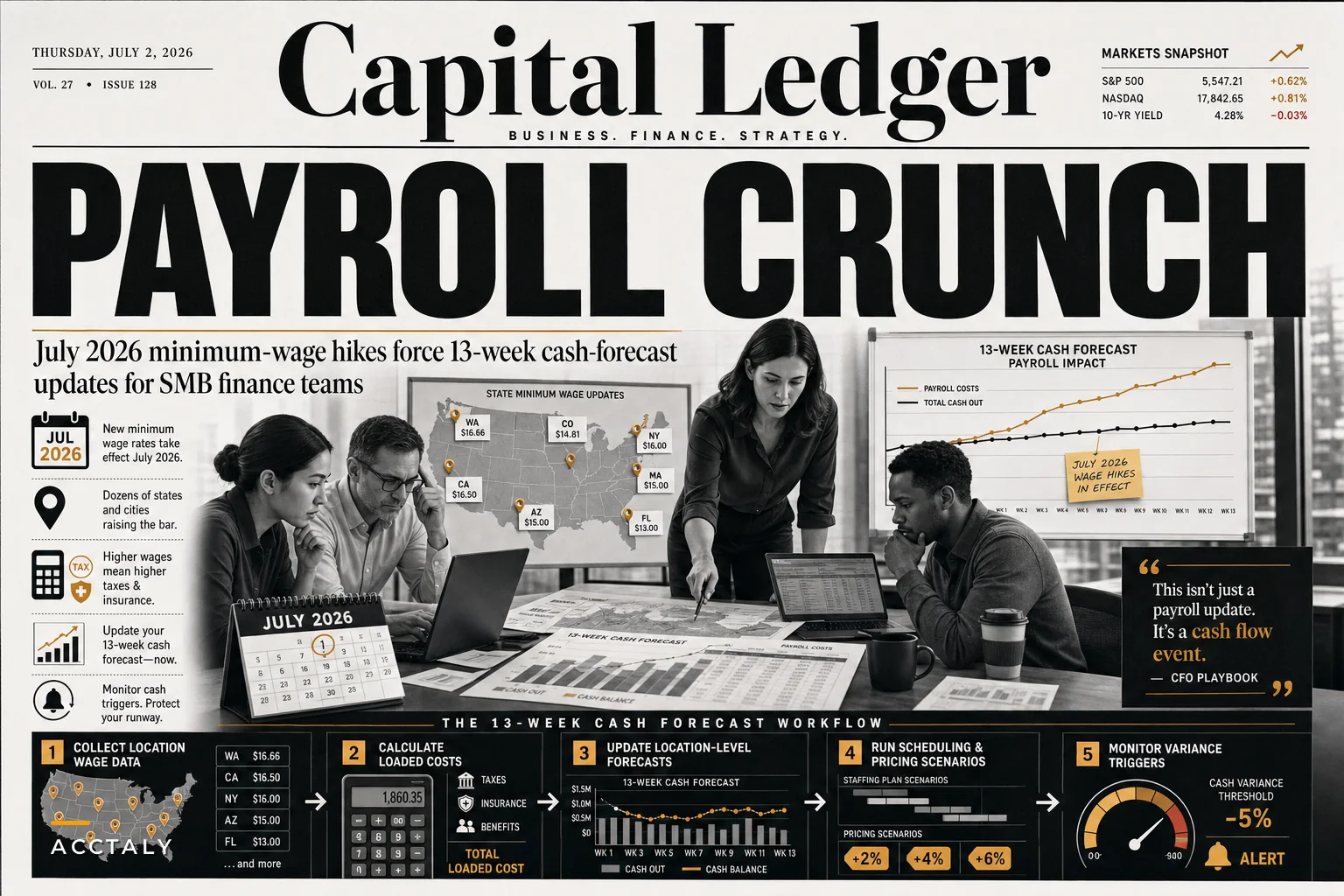

Our operations software flagged something unusual across our client base recently — businesses with locations in Oregon, Alaska, and California cities started hitting cash flow alerts at roughly three times the normal rate. Sales hadn't dropped. Receivables weren't aging. Payroll costs just jumped overnight.
More than 20 states and cities implemented minimum wage increases on July 1st, with some California localities pushing their wage floors past $18 an hour. For a business running 15 hourly employees per location, that extra $2/hour works out to roughly $4,800 in additional monthly payroll per site — before factoring in ripple effects on payroll taxes, workers' comp premiums, and wage compression for employees earning just above the new minimum.
Why Multi-Location Businesses Are Getting Hit Harder Than Expected This Summer
Our operations software flagged something unusual across our client base recently — businesses with locations in Oregon, Alaska, and California cities started hitting cash flow alerts at roughly three times the normal rate. Sales hadn't dropped. Receivables weren't aging. Payroll costs just jumped overnight.
More than 20 states and cities implemented minimum wage increases on July 1st, with some California localities pushing their wage floors past $18 an hour. For a business running 15 hourly employees per location, that extra $2/hour works out to roughly $4,800 in additional monthly payroll per site — before factoring in ripple effects on payroll taxes, workers' comp premiums, and wage compression for employees earning just above the new minimum.
The real problem isn't just the cost increase itself. Most multi-location businesses don't have systems built to handle asymmetric labor cost changes across their footprint. Your Portland location suddenly costs 8% more to operate than your Boise location. Your Los Angeles store needs different pricing than your Phoenix store. And if you're still working off company-wide labor cost assumptions, your 13-week cash forecast is probably already wrong.
Why Traditional Payroll Forecasting Breaks When Wage Floors Shift Unevenly
Most SMB finance teams forecast payroll the same way: take last month's number, apply a growth factor, adjust for headcount changes. That works fine when labor costs move predictably and uniformly.
Stop letting accounting slow your business down.
Acctaly automates your financial operations so you can focus on growth and compliance.
- Automated bookkeeping
- Real-time financial reporting
- Integrated tax management
No credit card required
-
San Francisco locations
$19.50/hour base wage
-
Oakland locations
$17.25/hour base wage
-
Sacramento locations
$16.00/hour base wage
-
Reno locations
$12.50/hour base wage
Multiply that variance across different roles, shift differentials, and overtime rules, and your payroll forecast becomes a location-by-location rebuild.
The compression effect makes it worse. When minimum wage rises to $17, your shift leads at $17.50 expect a bump too — otherwise you're paying a three-year employee almost the same as someone who started last week. So that $2 minimum wage increase ripples through your entire hourly wage structure, hitting people well above the new floor.
Then there's timing. California's city-level increases don't all kick in on the same date. Some went live July 1st. Others phase in over the following months. Your payroll system needs location-specific effective dates baked in, not just updated flat rates.
The Payroll Tax and Insurance Cascade Nobody Budgets For
What catches finance teams off guard most often: payroll isn't just wages. Every dollar of wage increase triggers additional costs that compound the cash hit.
That $4,800 monthly wage increase per location actually costs closer to $5,170 after employer-side FICA. Then add state unemployment insurance — in high-wage states, you might hit the taxable wage base faster, which front-loads your SUTA costs into early quarters. Workers' comp premiums scale with total payroll too. A restaurant paying $2 million in annual wages at a 4% comp rate pays $80,000 in premiums. Bump wages 12% and you're at $89,600 — nearly $10,000 in additional annual insurance costs that most operators simply don't forecast.
Benefits eligibility is another layer. Many SMBs set eligibility thresholds at specific wage or hours levels. When base wages rise, more employees may qualify for benefits they weren't receiving before, or 401(k) match obligations increase proportionally.
The timing mismatch is where cash flow actually gets squeezed. You pay higher wages in your very next payroll cycle. Adjusting customer pricing might take weeks — contracts, menu reprints, competitive dynamics. That gap between rising costs and revenue adjustments is the window where businesses get into real trouble.
Building Location-Specific Labor Models Into Your Cash Forecast
Company-level labor modeling falls apart when minimum wages fragment by geography. You need location-level detail that actually captures how your cost structure is changing.
Base wage matrices by location and role. Not just minimum wage — the full wage structure for each site. Track how each role's pay relates to the local minimum. Is your assistant manager at 1.3x minimum? Shift lead at 1.15x? These ratios let you model the full compression impact when minimums rise.
Effective date tracking. Some increases hit July 1st, others January 1st, others mid-year. Your forecast needs date-sensitive calculations, not static assumptions.
Hours distribution patterns. A higher minimum in San Francisco might mean scheduling fewer hours there relative to lower-cost locations. Model how you'll adjust scheduling, and what the operational floor actually is before you start cutting.
Location-specific overhead allocation. Workers' comp and SUTA calculations need to happen at the location level before rolling up to company totals. Same with benefits costs if eligibility varies by state.
Most SMBs try to manage all of this in spreadsheets. That creates a maintenance problem where every payroll cycle requires manual updates across multiple scenarios. Miss one location's increase and your 13-week cash projection could be off by tens of thousands.
This is where building a proper 13-week rolling forecast becomes genuinely important — not just for tracking wages, but for integrated scenario modeling that ties labor costs to revenue and cash positions simultaneously.
A simplified view of how location-level wage variance flows through to total loaded cost:
| Location | Base Wage | Est. Loaded Cost/hr (after taxes + comp) | Monthly Labor (150 hrs/wk) |
|---|---|---|---|
| San Francisco | $19.50 | ~$23.40 | ~$40,560 |
| Oakland | $17.25 | ~$20.70 | ~$35,880 |
| Sacramento | $16.00 | ~$19.20 | ~$33,280 |
| Reno | $12.50 | ~$15.00 | ~$26,000 |
These aren't exact figures — comp rates and SUTA vary — but the directional difference is real and it's exactly what a company-level average obscures.
A simple workflow for building location-specific labor models follows.
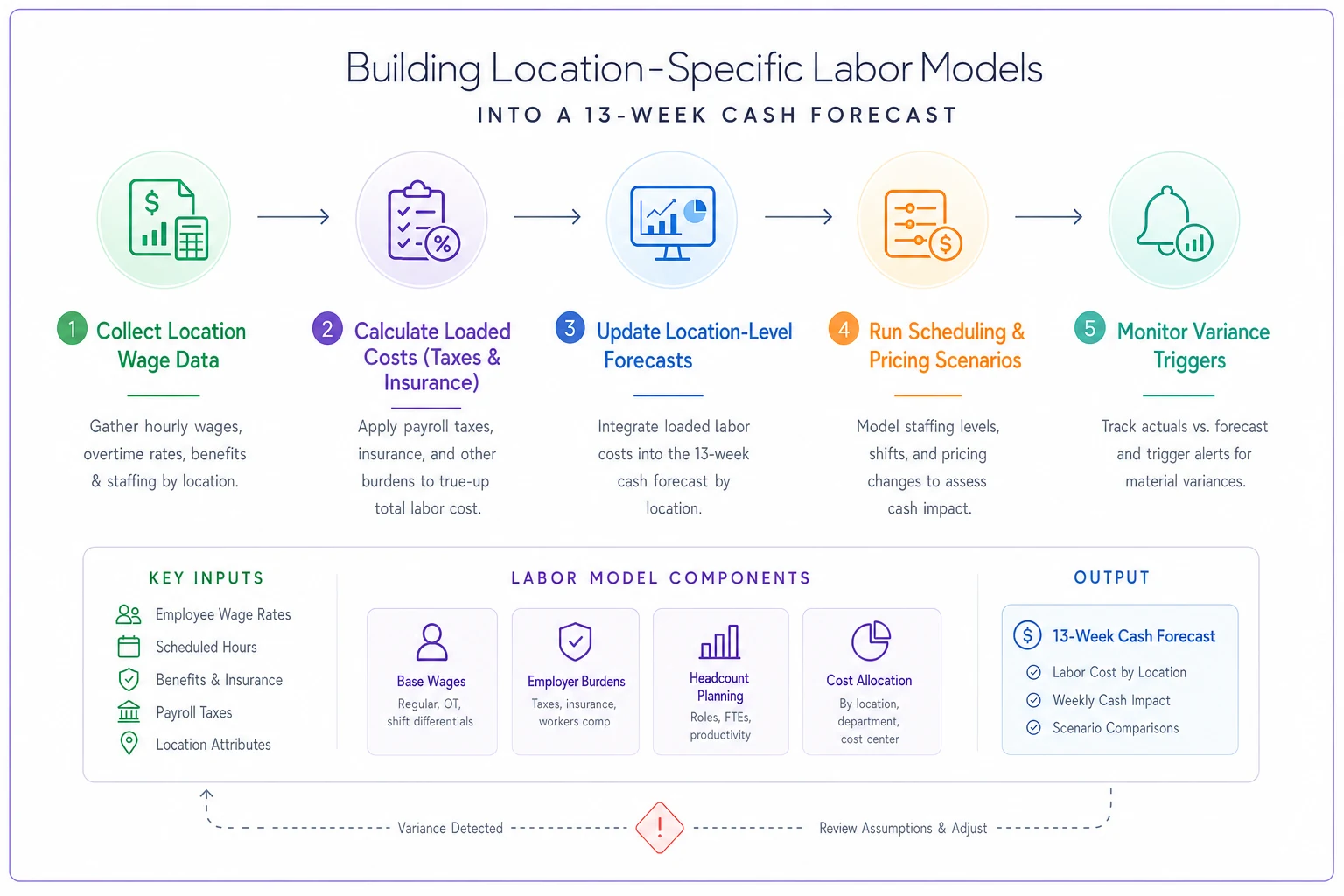
Most SMBs try to manage all of this in spreadsheets. That creates a maintenance problem where every payroll cycle requires manual updates across multiple scenarios. Miss one location's increase and your 13-week cash projection could be off by tens of thousands.
Creating Wage-Adjustment Scenarios Without Breaking Operations
The instinctive response to minimum wage increases is usually "cut hours" or "raise prices." Both can backfire badly if you're not careful.
Cutting hours sounds logical until you hit minimum coverage requirements. You can't run a retail store with one person. You can't serve a lunch rush on a skeleton crew. Below certain staffing thresholds, service quality drops enough that revenue falls more than you saved on labor — which defeats the whole point.
Price increases seem obvious, except your customers have options. Raise coffee prices 15% to cover wage increases and traffic might drop more than enough to wipe out the gain. The math rarely works cleanly, especially in competitive markets where customers are already price-sensitive.
More useful scenario planning looks like this:
Hybrid scheduling models. Instead of blanket hour cuts, model different coverage patterns. Eliminate overlapping shifts during slow periods but maintain full coverage at peak hours. Run scenarios that show revenue impact at different service levels before deciding.
Role consolidation analysis. Can your shift supervisor handle inventory counts? Can servers manage their own sections without bussers during off-peak hours? Model operational feasibility before assuming you can combine roles.
Technology substitution scenarios. Not the fancy stuff — practical changes like online ordering that reduces counter staff needs, or scheduling software that eliminates a part-time admin role.
Geographic price testing. Instead of uniform price increases, model location-specific pricing that reflects local labor costs. Your high-wage urban locations might sustain an 8% increase while suburban sites max out around 3%.
Build these scenarios before wage increases hit. Once they do, you're playing catch-up while burning cash.
The Compliance Checklist Everyone Forgets Until Penalties Hit
Minimum wage compliance seems straightforward — pay the new rate. Multi-location businesses face a lot more technical exposure than that.
Start with notice requirements. Many jurisdictions require posting new wage rates 30 days before the effective date. Miss that deadline and you face penalties even if you pay correctly. California localities are particularly aggressive about this.
Tip credit calculations get messier with higher minimums. States allowing tip credits have different rules about how tips offset minimum wage obligations. When the minimum rises, tip credit documentation needs updating or you risk owing back wages on past pay periods.
Overtime calculations shift too. Some states compute overtime as multiples of minimum wage for certain industries — so a minimum wage bump automatically raises overtime rates for employees already earning above minimum.
Then there's reporting. Many states now require wage and hour data at the location level. Your payroll system might calculate correctly but report incorrectly, creating audit exposure you won't find out about until years later.
The Department of Labor expects documentation showing when increases took effect, which employees were affected, and how calculations changed. Three years from now during an audit, can you prove you implemented the July 2026 increase correctly at every location?
Keep a centralized, dated folder (digital or physical) with wage notices and payroll change logs for each location to simplify audits.
The pattern tends to repeat: states raise minimum wages, then step up enforcement 6 to 12 months later, after businesses have adjusted but gotten sloppy on documentation. California and New York do this consistently.
Adjusting Payment Terms and Collection Cycles for the Cash Crunch
When payroll costs jump 10-15% overnight, your cash conversion cycle matters a lot more than it did before. Most SMBs can't absorb that hit without adjusting how they manage working capital.
Accounts receivable timing becomes more critical. If you're averaging 45 days to collection while paying wages every two weeks, that gap widens in dollar terms as wages rise. A business with $200,000 in monthly payroll that climbs to $230,000 needs an extra $30,000 in working capital just to maintain the same cash cushion — assuming nothing else changes.
The instinct is to pressure customers for faster payment. Aggressive collection tactics damage relationships though. Better to build systematic improvements:
Payment term segmentation. Not every customer needs the same terms. Reliable high-volume accounts might keep NET 30 while smaller or newer accounts move to NET 15 or require deposits upfront.
Automated follow-up sequences. Most SMBs collect slowly because follow-up is inconsistent. Automated reminders at days 25, 30, and 35 accelerate payment without feeling pushy or damaging relationships.
Early payment incentives. Offering 2% for payment within 10 days might cost less than the working capital strain of waiting 45 days. Model the trade-off against your actual cost of capital before deciding.
On the payables side, you need breathing room without destroying vendor relationships:
Critical versus flexible vendors. Payroll and rent go first. Among discretionary vendors, who can actually wait? Your marketing agency might accept NET 45 while your supplies vendor needs NET 30.
Payment run optimization. Batching payments weekly instead of paying as invoices arrive keeps cash visibility cleaner and lets you prioritize based on what's actually in the bank.
Vendor financing options. Some suppliers offer extended terms or financing that's cheaper than other working capital sources. A 1.5% monthly fee might beat a merchant cash advance at 4%.
On the payables side, you need breathing room without destroying vendor relationships.
Software Automation and AI-Assisted Forecasting for Multi-Location Complexity
Managing location-specific payroll changes, cash forecasts, and compliance requirements through spreadsheets gets unsustainable fast. The complexity multiplies with every new location and every new wage change cycle.
AI-powered operational software turns what's otherwise a painful manual process into something systematic. Not the version where software makes strategic decisions for you — practical automation that handles the repetitive calculations and monitoring that humans consistently get wrong under pressure.
Modern platforms can automatically pull wage requirements by location, calculate the full loaded cost impact including taxes and insurance, and update your cash forecast without manual intervention each cycle. When Oregon announces a mid-year adjustment, affected locations update automatically rather than waiting for someone to catch it.
Scenario modeling is where these platforms earn their keep. Instead of rebuilding spreadsheets to test different scheduling patterns or pricing adjustments, AI-assisted platforms run through scenarios showing the cash impact of different operational responses. You see which combination of hour adjustments, price changes, and payment term modifications actually closes the gap — before you've committed to anything.
Compliance tracking shifts from a manual checklist to automated monitoring. The system knows which notices need posting, which reports are due, and which calculations changed by location. It generates the documentation you'll need if auditors show up years later.
Integration with payroll systems means forecast-versus-actual variance gets surfaced automatically. You find out that a Los Angeles location is burning more cash than projected before it becomes a crisis, not after the quarter closes.
The real value isn't replacing human judgment. It's freeing finance teams from manual data wrangling so they can focus on actual operational decisions — not spreadsheet maintenance across a dozen locations with different rules.
When Geographic Wage Divergence Means Reconsidering Your Footprint
Sometimes the math just stops working. When minimum wages create 40-50% labor cost differences between markets, geographic strategy becomes a legitimate conversation to have.
That doesn't mean abandoning high-wage markets outright. But it might mean:
Shifting expansion plans. A third San Francisco location might not make sense when you could open five locations in Nevada for the same operating cost.
Format modifications. Full-service doesn't pencil at $19 hourly wages in some markets, but quick-service might. High-wage locations may need structurally different operating models than lower-cost sites.
Franchising considerations. Maybe you can't profitably operate corporate locations in certain markets, but franchisees with different cost structures can make it work.
Hub consolidation. One larger location might achieve better unit economics through scale than three smaller locations in expensive markets.
Any decision here requires honest four-wall margin analysis. Strip out allocations and corporate overhead — what is each site actually contributing on its own? When labor spikes, marginally profitable locations become money pits quickly.
Look at trajectory, not just current state. If California minimum wages keep rising 5% annually while neighboring states stay flat, a manageable 20% cost differential today compounds into something that genuinely doesn't work in five years.
Practical Steps for the Next 30 Days
The increases are here. Tactical responses are needed now. Here's what the next 30 days should look like:
Week 1: Compliance and calculation
-
Verify new rates for every location
-
Update payroll systems with correct effective dates
-
Post required notices at each site
-
Calculate full loaded cost impact including taxes and insurance
-
Document all changes for audit trail
Week 2: Cash forecast revision
-
Rebuild 13-week forecast with location-specific labor costs
-
Identify cash shortfall periods by week
-
Model collection acceleration scenarios
-
Prioritize payables by flexibility
-
Establish minimum cash thresholds by week
Week 3: Operational adjustments
-
Finalize scheduling changes by location
-
Implement approved price adjustments
-
Launch early payment discount programs where applicable
-
Adjust payment terms for new customers
-
Begin vendor payment term negotiations
Week 4: Monitoring and automation
-
Set up variance tracking for each location
-
Automate compliance reporting
-
Create triggers for cash preservation modes
-
Build templates for future wage adjustment cycles
-
Document lessons learned while they're still fresh
The businesses that handle these increases without drama aren't necessarily the ones with the biggest cash reserves. They're the ones with systems that can adapt quickly when cost structures shift. Manual spreadsheet management can't keep pace with location-level complexity once you're past a handful of sites.
Whether you build these capabilities internally or use AI-powered platforms to get there faster, the goal is the same — move from reactive scrambling to systematic adjustment. The next wage increase is already being planned somewhere. Your operations should be ready before it lands.
Ready to take control of your finances?
Join over 2,000 businesses using Acctaly to simplify accounting, accelerate cash flow, and ensure tax readiness.